
Skip to content
Free Excel Tutorials
  • Home
  • Excel For Beginners
  • Excel Intermediate
  • Advanced Excel For Experts

Data Analysis

  • How To Create Frequency Distribution in Excel
  • How to create running total in an Excel Table
  • How to calculate current stock or inventory in Excel
  • How to do a t-Test in Excel?
  • Excel Line Chart

References

  • How to use Excel OFFSET function
  • Offset in Excel
  • How to get address of named range in Excel
  • Excel Advanced Lookup using Index and Match Functions
  • Extract data with helper column in Excel

Data Validations

  • Excel Data validation require unique number
  • How To Create Drop-down List in Excel
  • Excel Data validation don’t exceed total
  • Excel Data validation exists in list
  • Excel Data validation date in next 30 days

How to get relative row numbers in a range in Excel

by

To get a full set of relative row numbers in a range, you can use an array formula based on the ROW function. See example below;

Formula

{=ROW(range)-ROW(range.firstcell)+1}
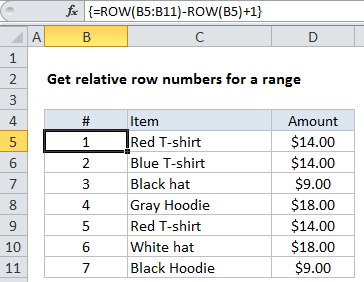
Note: this is an array formula that must be entered with Control + Shift + Enter. If you’re entering this on the worksheet (and not inside another formula), make a selection that includes more than one row, enter the formula, and confirm with Control + Shift + Enter.

Explanation

In the example shown, the formula in B5:B11 is:

{=ROW(B5:B11)-ROW(B5)+1}

This is formula will continue to generate relative numbers even when the range is moved. However, it’s not a good choice if rows need to be sorted, deleted, or added, because the array formula will prevent changes.

How this formula works

The first ROW function generates an array of 7 numbers like this:

{5;6;7;8;9;10;11}

The second ROW function generates an array with just one item like this:

{5}

which is then subtracted from the first array to yield:

{0;1;2;3;4;5;6}

Finally, 1 is added to get:

{1;2;3;4;5;6;7}

Generic version with named range

With a named range, you can create a more generic version of the formula using the MIN function or the INDEX function. For example, with the named range “list”, you can use MIN like this:

{ROW(list)-MIN(ROW(list))+1}

With INDEX, we fetch the first reference in the named range, and using ROW on that:

{=ROW(list)-ROW(INDEX(list,1,1))+1}

You’ll often see “relative row” formulas like this inside complex array formulas that need row numbers to calculate a result.

Post navigation

Previous Post:

How to calculate project complete percentage in Excel

Next Post:

Popularly Used Excel Functions and their examples

Leave a Reply Cancel reply

Your email address will not be published. Required fields are marked *

Learn Basic Excel

Ribbon
Workbook
Worksheets
Format Cells
Find & Select
Sort & Filter
Templates
Print
Share
Protect
Keyboard Shortcuts

Categories

  • Charts
  • Data Analysis
  • Data Validation
  • Excel Functions
    • Cube Functions
    • Database Functions
    • Date and Time Functions
    • Engineering Functions
    • Financial Functions
    • Information Functions
    • Logical Functions
    • Lookup and Reference Functions
    • Math and Trig Functions
    • Statistical Functions
    • Text Functions
    • Web Functions
  • Excel VBA
  • Excel Video Tutorials
  • Formatting
  • Grouping
  • Others

Logical Functions

  • Extract multiple matches into separate rows in Excel
  • IFERROR function: Description, Usage, Syntax, Examples and Explanation
  • OR function Examples in Excel
  • IF with boolean logic in Excel
  • AND function: Description, Usage, Syntax, Examples and Explanation

Date Time

  • DAYS function: Description, Usage, Syntax, Examples and Explanation
  • TIMEVALUE function: Description, Usage, Syntax, Examples and Explanation
  • Get month from date in Excel
  • How to get year from date in Excel
  • Get work hours between dates custom schedule in Excel

Grouping

  • Running count group by n size in Excel
  • Map text to numbers in Excel
  • Group arbitrary text values in Excel
  • Group times into 3 hour buckets in Excel
  • How to randomly assign data to groups in Excel

General

  • Creating and Opening an existing file in Excel
  • Count cells that do not contain errors in Excel
  • How to calculate percent of goal in Excel
  • How to fill cell ranges with random number from fixed set of options in Excel
  • How to create dynamic named range with INDEX in Excel
© 2025 xlsoffice . All Right Reserved. | Teal Smiles | Abbreviations And Their Meaning