
Skip to content
Free Excel Tutorials
  • Home
  • Excel For Beginners
  • Excel Intermediate
  • Advanced Excel For Experts

Data Analysis

  • How to Create Thermometer Chart in Excel
  • Use Data Form to input, edit and delete records in Excel
  • How to combine 2 or more chart types in a single chart in Excel
  • How To Compare Two Lists in Excel
  • How to Create One and Two Variable Data Tables in Excel

References

  • MATCH function: Description, Usage, Syntax, Examples and Explanation
  • How to use Excel LOOKUP Function
  • Two-column Lookup in Excel
  • Vlookup Examples in Excel
  • How to use Excel INDIRECT Function

Data Validations

  • Excel Data validation date in next 30 days
  • Excel Data validation specific characters only
  • Excel Data validation date in specific year
  • Excel Data validation unique values only
  • Prevent invalid data entering in specific cells

How to use Excel FORMULATEXT function

by

This Excel tutorial explains how to use the FORMULATEXT function with syntax and examples.

Excel FORMULATEXT function Description

FORMULATEXT function can be used in troubleshooting and auditing.  The Excel FormulaText function returns a formula as a text string.
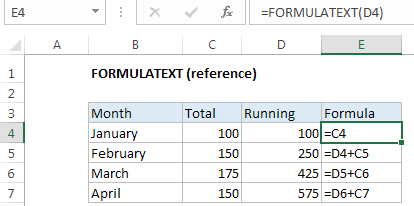
Explanation:  The Excel FORMULATEXT function returns a formula as a text string from given reference. You can use FORMULATEXT to extract a formula as text from a cell. If you use FORMULATEXT on a cell that doesn’t contain a formula, you’ll get an #N/A error.

Syntax

FORMULATEXT (reference)

Note: where the reference argument is a reference to a cell in an Excel worksheet. This may be in a different worksheet in the current workbook, or in another workbook that is currently open.

If the supplied reference refers to a workbook that is not currently open, the FormulaText function will return the #N/A error.

Returns

The formula as text

Post navigation

Previous Post:

VLOOKUP without #N/A error in Excel

Next Post:

Manipulating text strings using Left, Mid, Right, Len, Substitute in Excel

Leave a Reply Cancel reply

Your email address will not be published. Required fields are marked *

Learn Basic Excel

Ribbon
Workbook
Worksheets
Format Cells
Find & Select
Sort & Filter
Templates
Print
Share
Protect
Keyboard Shortcuts

Categories

  • Charts
  • Data Analysis
  • Data Validation
  • Excel Functions
    • Cube Functions
    • Database Functions
    • Date and Time Functions
    • Engineering Functions
    • Financial Functions
    • Information Functions
    • Logical Functions
    • Lookup and Reference Functions
    • Math and Trig Functions
    • Statistical Functions
    • Text Functions
    • Web Functions
  • Excel VBA
  • Excel Video Tutorials
  • Formatting
  • Grouping
  • Others

Logical Functions

  • How to return blank in place of #DIV/0! error in Excel
  • Extract multiple matches into separate rows in Excel
  • Invoice status with nested if in Excel
  • IFS function: Description, Usage, Syntax, Examples and Explanation
  • OR function: Description, Usage, Syntax, Examples and Explanation

Date Time

  • Get project midpoint in Excel
  • Calculate series of dates by workdays in Excel
  • How to calculate percent of year complete in Excel
  • How to calculate workdays per month in Excel
  • Count birthdays by month in Excel

Grouping

  • How to randomly assign data to groups in Excel
  • Categorize text with keywords in Excel
  • Group arbitrary text values in Excel
  • Map text to numbers in Excel
  • Calculate conditional mode with criteria in Excel

General

  • How to generate random times at specific intervals in Excel
  • Split Cell Content Using Text to Columns in Excel
  • How to calculate decrease by percentage in Excel
  • Check if range contains a value not in another range in Excel
  • With vs Without Array Formula in Excel
© 2026 xlsoffice . All Right Reserved. | Teal Smiles | Abbreviations And Their Meaning