
Skip to content
Free Excel Tutorials
  • Home
  • Excel For Beginners
  • Excel Intermediate
  • Advanced Excel For Experts

Data Analysis

  • How to calculate correlation coefficient Correlation in Excel
  • How to Create Area Chart in Excel
  • What-If Analysis: Scenarios and Goal Seek in Excel
  • Working With Tables in Excel
  • How to count table columns in Excel

References

  • Find Closest Match in Excel Using INDEX, MATCH, ABS and MIN functions
  • VLOOKUP function: Description, Usage, Syntax, Examples and Explanation
  • Create hyperlink with VLOOKUP in Excel
  • Get nth match with INDEX / MATCH in Excel
  • Merge tables with VLOOKUP in Excel

Data Validations

  • Excel Data validation allow weekday only
  • Excel Data validation with conditional list
  • Excel Data validation unique values only
  • Excel Data validation require unique number
  • Excel Data validation only dates between

How to use Excel COLUMNS Function

by

This Excel tutorial explains how to use the COLUMNS function with syntax and examples.

Excel COLUMNS function Description

The Microsoft Excel COLUMNS function returns the number of columns in a cell reference.

The COLUMNS function is a built-in function in Excel that is categorized as a Lookup/Reference Function. It can be used as a worksheet function in Excel. As a worksheet function, the COLUMNS function can be entered as part of a formula in a cell of a worksheet.
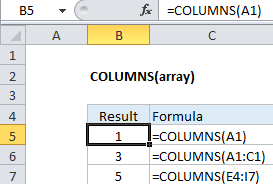
Explanation: The Excel COLUMNS function returns the count of columns in a given reference. For example, COLUMNS(A1:C3) returns 3, since the range A1:C3 contains 3 columns.

Syntax

The syntax for the COLUMNS function in Microsoft Excel is:

COLUMNS( reference )

Returns

The COLUMNS function returns a numeric value.

Post navigation

Previous Post:

VLOOKUP without #N/A error in Excel

Next Post:

Manipulating text strings using Left, Mid, Right, Len, Substitute in Excel

Leave a Reply Cancel reply

Your email address will not be published. Required fields are marked *

Learn Basic Excel

Ribbon
Workbook
Worksheets
Format Cells
Find & Select
Sort & Filter
Templates
Print
Share
Protect
Keyboard Shortcuts

Categories

  • Charts
  • Data Analysis
  • Data Validation
  • Excel Functions
    • Cube Functions
    • Database Functions
    • Date and Time Functions
    • Engineering Functions
    • Financial Functions
    • Information Functions
    • Logical Functions
    • Lookup and Reference Functions
    • Math and Trig Functions
    • Statistical Functions
    • Text Functions
    • Web Functions
  • Excel VBA
  • Excel Video Tutorials
  • Formatting
  • Grouping
  • Others

Logical Functions

  • How to use IFS function in Excel
  • Complete List of Excel Logical Functions, References and Examples
  • XOR function: Description, Usage, Syntax, Examples and Explanation
  • NOT function: Description, Usage, Syntax, Examples and Explanation
  • IF with boolean logic in Excel

Date Time

  • Get month name from date in Excel
  • How to Calculate Age in Excel
  • Get days, hours, and minutes between dates in Excel
  • Add months to date in Excel
  • Count holidays between two dates in Excel

Grouping

  • Group arbitrary text values in Excel
  • Group numbers with VLOOKUP in Excel
  • Map text to numbers in Excel
  • If cell contains one of many things in Excel
  • How to randomly assign people to groups in Excel

General

  • How to calculate percent variance in Excel
  • Subtotal invoices by age in Excel
  • Excel Ribbon Quick Overview For Beginners
  • Basic text sort formula in Excel
  • Hide and Unhide Columns or Rows in Excel
© 2026 xlsoffice . All Right Reserved. | Teal Smiles | Abbreviations And Their Meaning